PAR Sensor
About the product
A PAR Sensor measures the quantity and quality of light available to plants within a growing environment. PAR stands for photosynthetically active radiation, and these Sensors can provide valuable data on the intensity and spectrum of light that plants require for optimal growth and development. PAR Sensors work by detecting the number of photons in the range of 400-700 nm, which is the range of light that plants use for photosynthesis. The Sensor data can be used to adjust artificial lighting systems or to optimize plant positioning within the greenhouse to maximize light exposure. If you're interested in optimizing your greenhouse for plant growth and yield, consider adding a PAR Sensor to your collection of horticulture tools today.
Specification
● Temperature range: 15-30°C (59-86F),
● Humidity range: 0-99% (RH),
● Spectral range: 400-750 nm ±5 nm,
● Cable length: 5m (16.4ft).
Installation
-
The module Sensor Director turning off from power supply.
-
Place the sensor PAR under the LED’s panel.
-
Connect the sensor PAR to the module Sensor Director.
-
Turn on the LED’s.
-
Connect the module Sensor Director to power supply.
-
On the app going to Module → Sensors → Analog sensor.
-
Typing on Analog sensor, choosing type (PAR) and typing on “V” in the upper right corner.
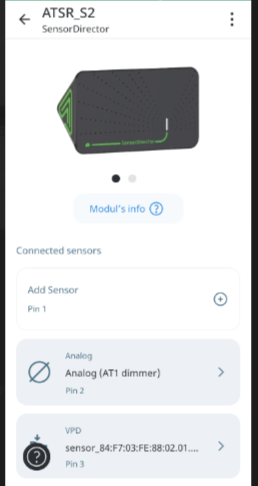
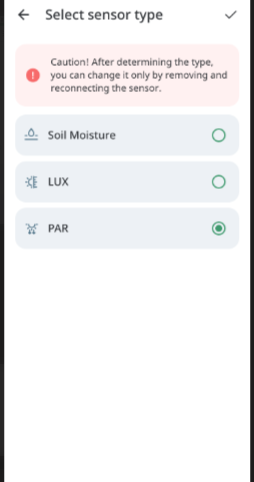
8. Wait until the sensor type update is complete.
9. The application automatically returns to the module details screen. The PAR sensor is displayed on its assigned pin and is available on the Climate page.
Application behavior
-
PAR does not require calibration.
-
The “Calibration is not available” screen is not shown after assigning the PAR type.
-
The application does not send calibration status or calibration start requests for PAR during this flow.
-
The behavior is the same on Android, iOS, and Web.
Calibration
No calibration is required.